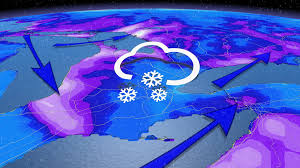
As autumn's vibrant leaves begin to give way to the first whispers of winter, Southern Ontario is bracing for a picturesque yet challenging transformation. The arrival of fall's first snow in Toronto, Niagara, and Ottawa promises not only stunning snowy landscapes but also a reality check for drivers across the region. With roads slick and visibility reduced, this seasonal shift will put patience—and driving skills—to the ultimate test. Whether you're a seasoned commuter or an occasional driver, buckle up as we delve into essential tips and insights to navigate through this frosty debut while keeping your cool behind the wheel!
Enabling loopback connections in WordPress means making sure your server can make HTTP requests to itself (e.g., calling https://yoursite.com/wp-cron.php from within itself). Loopback is required for: WP-Cron jobs Plugin/theme editors (to verify file write permissions) Some site health checks ( Tools > Site Health ) Automatic updates ✅ What Is a Loopback Request? A loopback is when your WordPress site tries to request a URL from itself using tools like wp_remote_get() or fsockopen() . For example: $response = wp_remote_get ( home_url ( '/wp-cron.php' ) ); If this fails, you might see warnings in Tools > Site Health like: “Your site could not complete a loopback request.” 🛠 How to Enable Loopback Requests Here are the key steps depending on your hosting/server setup: ✅ 1. Make Sure localhost or Domain Resolves Internally Check your server can resolve requests to itself. Use this quick PHP script: Create a file test-loopback.php i...
Comments
Post a Comment