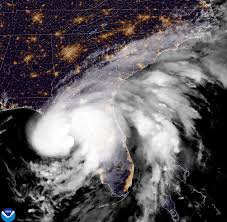
As the winds howled and the skies darkened, Hurricane Debby unleashed its fury on the Sunshine State, making landfall as a Category 1 hurricane. With powerful gusts and relentless rain, this storm has left an indelible mark on Florida's landscape—and sadly, on its communities. Tragically, at least four lives have been lost in the wake of Debby's wrath. In this post, we'll delve into the latest updates from affected areas, explore heroic rescue efforts underway, and reflect on how Floridians are coming together to weather this storm. Stay with us as we navigate through both the devastation and resilience that define our response to nature's fiercest challenges.
Enabling loopback connections in WordPress means making sure your server can make HTTP requests to itself (e.g., calling https://yoursite.com/wp-cron.php from within itself). Loopback is required for: WP-Cron jobs Plugin/theme editors (to verify file write permissions) Some site health checks ( Tools > Site Health ) Automatic updates ✅ What Is a Loopback Request? A loopback is when your WordPress site tries to request a URL from itself using tools like wp_remote_get() or fsockopen() . For example: $response = wp_remote_get ( home_url ( '/wp-cron.php' ) ); If this fails, you might see warnings in Tools > Site Health like: “Your site could not complete a loopback request.” 🛠 How to Enable Loopback Requests Here are the key steps depending on your hosting/server setup: ✅ 1. Make Sure localhost or Domain Resolves Internally Check your server can resolve requests to itself. Use this quick PHP script: Create a file test-loopback.php i...
Comments
Post a Comment