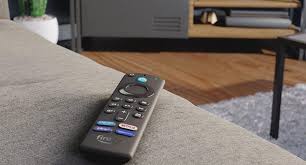
Attention all entertainment enthusiasts! Get ready to elevate your TV viewing experience with an unbelievable offer. Brace yourselves, because the highly coveted Amazon Fire TV Sticks are now up to 20 percent off! Yes, you heard that right – this is your chance to transform any ordinary television into a powerhouse of endless streaming possibilities. Whether you're a binge-watcher, sports fanatic, or simply seeking unparalleled convenience in accessing all your favorite shows and movies, the time has come to grab this incredible deal. So sit back, relax, and let us take you on a journey through the world of Amazon Fire TV Stick discounts that will leave you breathless and itching to hit that "Add to Cart" button!
Enabling loopback connections in WordPress means making sure your server can make HTTP requests to itself (e.g., calling https://yoursite.com/wp-cron.php from within itself). Loopback is required for: WP-Cron jobs Plugin/theme editors (to verify file write permissions) Some site health checks ( Tools > Site Health ) Automatic updates ✅ What Is a Loopback Request? A loopback is when your WordPress site tries to request a URL from itself using tools like wp_remote_get() or fsockopen() . For example: $response = wp_remote_get ( home_url ( '/wp-cron.php' ) ); If this fails, you might see warnings in Tools > Site Health like: “Your site could not complete a loopback request.” 🛠 How to Enable Loopback Requests Here are the key steps depending on your hosting/server setup: ✅ 1. Make Sure localhost or Domain Resolves Internally Check your server can resolve requests to itself. Use this quick PHP script: Create a file test-loopback.php i...
Comments
Post a Comment