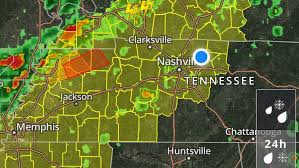
Attention, all weather enthusiasts and Middle Tennessee residents! Brace yourselves for a whirlwind of news as we bring you the latest update on Code Red Weather. Buckle up, because today we're diving into an urgent development that has taken our region by storm: a Tornado Watch issued for multiple parts of Middle Tennessee and Kentucky. With dark clouds looming overhead and winds howling in anticipation, it's crucial to stay informed about this potentially dangerous situation. So grab your raincoats, secure your belongings, and join us as we unravel the details behind this gripping weather phenomenon. Safety first – let's navigate through these turbulent skies together!
Enabling loopback connections in WordPress means making sure your server can make HTTP requests to itself (e.g., calling https://yoursite.com/wp-cron.php from within itself). Loopback is required for: WP-Cron jobs Plugin/theme editors (to verify file write permissions) Some site health checks ( Tools > Site Health ) Automatic updates ✅ What Is a Loopback Request? A loopback is when your WordPress site tries to request a URL from itself using tools like wp_remote_get() or fsockopen() . For example: $response = wp_remote_get ( home_url ( '/wp-cron.php' ) ); If this fails, you might see warnings in Tools > Site Health like: “Your site could not complete a loopback request.” 🛠 How to Enable Loopback Requests Here are the key steps depending on your hosting/server setup: ✅ 1. Make Sure localhost or Domain Resolves Internally Check your server can resolve requests to itself. Use this quick PHP script: Create a file test-loopback.php i...
Comments
Post a Comment