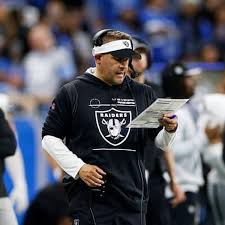
Attention, football fanatics and armchair analysts! Strap on your helmets and prepare for the ultimate gridiron showdown as we delve into the latest blockbuster news from Sin City. In a move that shook the NFL world to its core, the Las Vegas Raiders have made an earth-shattering decision: they've handed pink slips to head coach Josh McDaniels and their esteemed General Manager Dave Ziegler. With whispers of controversy circling this unexpected move, it's time to don our detective hats, break down Xs and Os, and uncover why exactly Las Vegas has pulled the trigger on such a game-changing decision – right now! So grab some popcorn, settle in your favorite spot on the couch, because today we're about to score insights like never before!
Enabling loopback connections in WordPress means making sure your server can make HTTP requests to itself (e.g., calling https://yoursite.com/wp-cron.php from within itself). Loopback is required for: WP-Cron jobs Plugin/theme editors (to verify file write permissions) Some site health checks ( Tools > Site Health ) Automatic updates ✅ What Is a Loopback Request? A loopback is when your WordPress site tries to request a URL from itself using tools like wp_remote_get() or fsockopen() . For example: $response = wp_remote_get ( home_url ( '/wp-cron.php' ) ); If this fails, you might see warnings in Tools > Site Health like: “Your site could not complete a loopback request.” 🛠 How to Enable Loopback Requests Here are the key steps depending on your hosting/server setup: ✅ 1. Make Sure localhost or Domain Resolves Internally Check your server can resolve requests to itself. Use this quick PHP script: Create a file test-loopback.php i...
Comments
Post a Comment