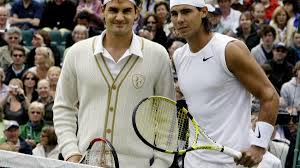
As the sun sets on an era defined by unparalleled athleticism and fierce rivalry, tennis legends Roger Federer and Rafael Nadal find themselves at a poignant crossroads. In a heartfelt tribute to his long-time rival, Federer recently hailed Nadal as a "historic" figure in the sport—a sentiment that encapsulates not just their shared battles on the court but also a deep mutual respect forged over years of competition and camaraderie. With Nadal's imminent retirement looming large, fans around the world are reflecting on what these two icons have brought to tennis and how their unique stories intertwine. Join us as we delve into Federer's touching words about Nadal's monumental impact on the game, celebrating not only their legendary matches but also the profound friendship that has blossomed amid fierce competition.
Enabling loopback connections in WordPress means making sure your server can make HTTP requests to itself (e.g., calling https://yoursite.com/wp-cron.php from within itself). Loopback is required for: WP-Cron jobs Plugin/theme editors (to verify file write permissions) Some site health checks ( Tools > Site Health ) Automatic updates ✅ What Is a Loopback Request? A loopback is when your WordPress site tries to request a URL from itself using tools like wp_remote_get() or fsockopen() . For example: $response = wp_remote_get ( home_url ( '/wp-cron.php' ) ); If this fails, you might see warnings in Tools > Site Health like: “Your site could not complete a loopback request.” 🛠 How to Enable Loopback Requests Here are the key steps depending on your hosting/server setup: ✅ 1. Make Sure localhost or Domain Resolves Internally Check your server can resolve requests to itself. Use this quick PHP script: Create a file test-loopback.php i...
Comments
Post a Comment