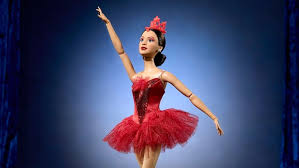
Step into a world where grace, talent, and cultural heritage take center stage! The iconic Barbie doll has once again redefined the meaning of representation by honoring America's first prima ballerina and proud Osage member, Maria Tallchief. In this blog post, we celebrate the legacy of a trailblazer who danced her way into history and shattered glass ceilings in the world of ballet. With each plié and pirouette, Tallchief not only captivated audiences but also paved the way for future generations of dancers—showing that dreams can soar when rooted in one's identity. Join us as we explore how this new Barbie doll pays tribute to an extraordinary figure whose influence transcends art and culture, inspiring young dreamers everywhere to embrace their uniqueness while pursuing their passions!
Enabling loopback connections in WordPress means making sure your server can make HTTP requests to itself (e.g., calling https://yoursite.com/wp-cron.php from within itself). Loopback is required for: WP-Cron jobs Plugin/theme editors (to verify file write permissions) Some site health checks ( Tools > Site Health ) Automatic updates ✅ What Is a Loopback Request? A loopback is when your WordPress site tries to request a URL from itself using tools like wp_remote_get() or fsockopen() . For example: $response = wp_remote_get ( home_url ( '/wp-cron.php' ) ); If this fails, you might see warnings in Tools > Site Health like: “Your site could not complete a loopback request.” 🛠 How to Enable Loopback Requests Here are the key steps depending on your hosting/server setup: ✅ 1. Make Sure localhost or Domain Resolves Internally Check your server can resolve requests to itself. Use this quick PHP script: Create a file test-loopback.php i...
Comments
Post a Comment