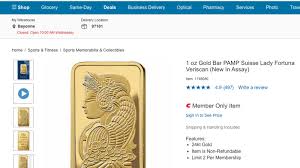
"Shimmering, versatile, and always the epitome of timeless value – gold has captivated humanity for centuries. And it seems that in today's uncertain times, its allure is stronger than ever. In a surprising revelation, Costco, the beloved warehouse retailer known for bulk groceries and incredible bargains, quietly emerged as an unexpected player in the world of precious metals. Brace yourself: they sold over $100 million worth of gleaming gold bars last quarter alone! Join us as we delve into this fascinating phenomenon and uncover why even amidst chaos and uncertainty, gold continues to reign supreme."
Enabling loopback connections in WordPress means making sure your server can make HTTP requests to itself (e.g., calling https://yoursite.com/wp-cron.php from within itself). Loopback is required for: WP-Cron jobs Plugin/theme editors (to verify file write permissions) Some site health checks ( Tools > Site Health ) Automatic updates ✅ What Is a Loopback Request? A loopback is when your WordPress site tries to request a URL from itself using tools like wp_remote_get() or fsockopen() . For example: $response = wp_remote_get ( home_url ( '/wp-cron.php' ) ); If this fails, you might see warnings in Tools > Site Health like: “Your site could not complete a loopback request.” 🛠 How to Enable Loopback Requests Here are the key steps depending on your hosting/server setup: ✅ 1. Make Sure localhost or Domain Resolves Internally Check your server can resolve requests to itself. Use this quick PHP script: Create a file test-loopback.php i...
Comments
Post a Comment