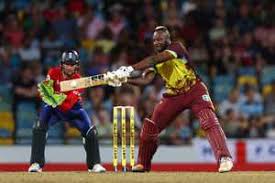
England and the West Indies, two cricketing powerhouses with a rich history of fierce battles, are set to clash once again. But this time, the stakes feel higher than ever. As England steps onto the pitch, battle-scarred from their recent encounters and facing an opponent in their comfort zone, it's a showdown that promises nothing short of thrilling action and unmissable drama. Get ready to witness a clash where pride will be on the line, as these titans lock horns in pursuit of victory.
Enabling loopback connections in WordPress means making sure your server can make HTTP requests to itself (e.g., calling https://yoursite.com/wp-cron.php from within itself). Loopback is required for: WP-Cron jobs Plugin/theme editors (to verify file write permissions) Some site health checks ( Tools > Site Health ) Automatic updates ✅ What Is a Loopback Request? A loopback is when your WordPress site tries to request a URL from itself using tools like wp_remote_get() or fsockopen() . For example: $response = wp_remote_get ( home_url ( '/wp-cron.php' ) ); If this fails, you might see warnings in Tools > Site Health like: “Your site could not complete a loopback request.” 🛠 How to Enable Loopback Requests Here are the key steps depending on your hosting/server setup: ✅ 1. Make Sure localhost or Domain Resolves Internally Check your server can resolve requests to itself. Use this quick PHP script: Create a file test-loopback.php i...
Comments
Post a Comment