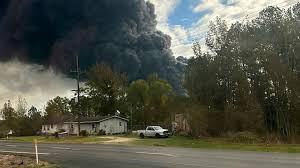
Breaking News: Shelter-in-Place Order Issued After Texas Chemical Plant Explosion! Brace yourself for a heart-pounding account of the recent catastrophic event that has sent shockwaves through the Lone Star State. With smoke billowing into the sky and fear gripping communities, we delve deep into what caused this devastating explosion and how authorities are scrambling to protect lives amidst the chaos. Get ready to be informed, captivated, and inspired as we unpack the heroic efforts unfolding in the aftermath of this tragedy. Strap in, because it's going to be an adrenaline-fueled ride you won't want to miss!
Enabling loopback connections in WordPress means making sure your server can make HTTP requests to itself (e.g., calling https://yoursite.com/wp-cron.php from within itself). Loopback is required for: WP-Cron jobs Plugin/theme editors (to verify file write permissions) Some site health checks ( Tools > Site Health ) Automatic updates ✅ What Is a Loopback Request? A loopback is when your WordPress site tries to request a URL from itself using tools like wp_remote_get() or fsockopen() . For example: $response = wp_remote_get ( home_url ( '/wp-cron.php' ) ); If this fails, you might see warnings in Tools > Site Health like: “Your site could not complete a loopback request.” 🛠 How to Enable Loopback Requests Here are the key steps depending on your hosting/server setup: ✅ 1. Make Sure localhost or Domain Resolves Internally Check your server can resolve requests to itself. Use this quick PHP script: Create a file test-loopback.php i...
Comments
Post a Comment