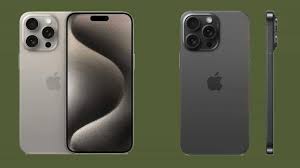
Welcome to the future of mobile technology! The iPhone 15 has arrived, and with it comes a powerful blend of unmatched performance and cutting-edge features that are set to redefine your smartphone experience. Whether you're a tech enthusiast eager for the latest innovations or simply seeking a device that elevates your everyday tasks, the iPhone 15 promises to deliver. From enhanced processing power that keeps everything running smoothly to groundbreaking camera capabilities that capture life in stunning detail, this device is more than just an upgrade—it's a game changer. Join us as we dive into what makes the iPhone 15 not just another phone, but an essential companion for anyone ready to embrace tomorrow's possibilities today!
Enabling loopback connections in WordPress means making sure your server can make HTTP requests to itself (e.g., calling https://yoursite.com/wp-cron.php from within itself). Loopback is required for: WP-Cron jobs Plugin/theme editors (to verify file write permissions) Some site health checks ( Tools > Site Health ) Automatic updates ✅ What Is a Loopback Request? A loopback is when your WordPress site tries to request a URL from itself using tools like wp_remote_get() or fsockopen() . For example: $response = wp_remote_get ( home_url ( '/wp-cron.php' ) ); If this fails, you might see warnings in Tools > Site Health like: “Your site could not complete a loopback request.” 🛠 How to Enable Loopback Requests Here are the key steps depending on your hosting/server setup: ✅ 1. Make Sure localhost or Domain Resolves Internally Check your server can resolve requests to itself. Use this quick PHP script: Create a file test-loopback.php i...
Comments
Post a Comment